Embroidery
The Best Embroidery Machines for Beginners
 By Rachel TorresQuilting & embroidery editor
First embroidery machines ranked on hoop size, built-in designs and how you get designs onto the machine — not physical product trials.
Our top picks at a glance
| Model | Pick | Type | Max embroidery area | Built-in designs | Wireless | Sews too? | Price band | Check price |
|---|---|---|---|---|---|---|---|---|
| Best embroidery-only | Embroidery only | 4″ × 4″ | 135 | Yes (wireless LAN) | No | Mid-range | ||
| Best sewing + embroidery combo | Combo | 4″ × 4″ | 135 | Yes (Artspira) | Yes (103 stitches) | Mid-range | ||
| Best 5×7 combo | Combo | 5″ × 7″ | 193 | — | Yes (241 stitches) | Premium |
How we chose embroidery machines
Discontinued models still show up in search. Brother has discontinued the PE535, PE800 and SE600. Third-party sellers still list them; their current replacements are the PE545, PE900 and SE700/SE2000.
The best embroidery machines for beginners, reviewed
Best embroidery-only
Best embroidery-only
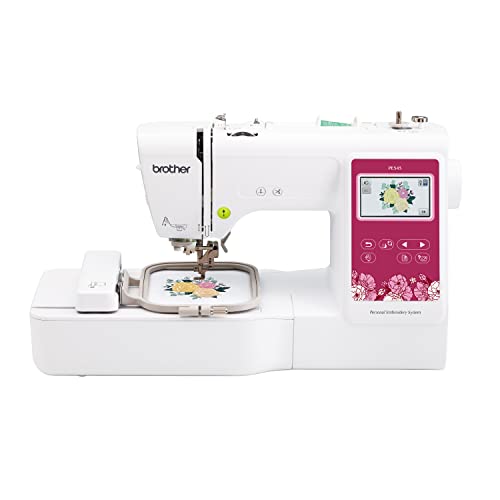
Brother PE545 (opens Amazon in a new tab)
Best for: Beginners who want embroidery only without paying for a sewing combo
- Embroidery area: 4" x 4"Source
- Built-in designs: 135Source
- Fonts: 10Source
- Connectivity: Wireless LANSource
- Screen: 3.7" color touchscreenSource
Pros
- Embroidery-focused workspace
- Wireless design transfer
- Color touchscreen for editing on the machine
Cons
- Does not sew construction seams
- 4" x 4" field limits larger motifs
Skip it if: You still need a machine that sews seams and zippers
What owners mention
Praise
- focused embroidery tool
- wireless convenience
Complaints
- need a separate sewing machine
- hoop size ceiling
The PE545 is the embroidery-only starter: a 4″ × 4″ field, 135 built-in designs, ten fonts, wireless LAN and a 3.7″ color touchscreen on Brother’s page. Choose it when you already own a sewing machine and want a dedicated embroidery workspace. Skip it if you still need seams, zippers and buttonholes on the same tool.
Best sewing + embroidery combo
Best sewing + embroidery combo
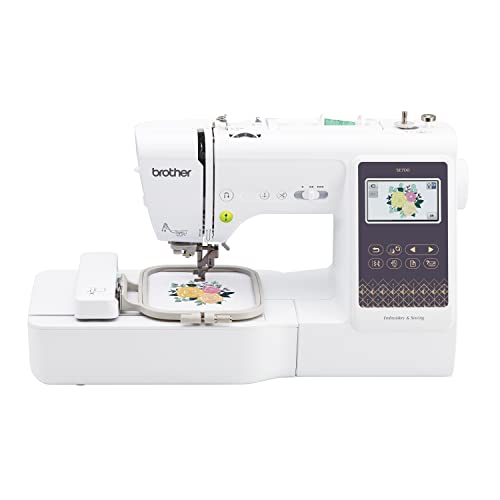
Brother SE700 (opens Amazon in a new tab)
Best for: Hobbyists who want everyday sewing plus small embroidery on one machine
- Embroidery area: 4" x 4"Source
- Built-in designs: 135Source
- Sewing stitches: 103Source
- Connectivity: Wireless LAN; Artspira appSource
Pros
- Sewing and embroidery in one footprint
- Wireless design transfer through Artspira
- Solid built-in design and stitch counts for home use
Cons
- 4" x 4" field limits jacket-back motifs
- App workflow has a learning curve for some owners
Skip it if: You need designs larger than 4" x 4" in a single hoop
What owners mention
Praise
- convenient combo
- wireless transfer
Complaints
- small embroidery field
- app setup takes patience
The SE700 pairs 103 sewing stitches with the same 4″ × 4″ embroidery area, 135 designs and wireless transfer through Artspira. It is the combo pick for hobbyists who want monograms and small motifs plus everyday sewing in one footprint. Full write-up: Brother SE700 review. First sewing-machine context also sits on best sewing machines for beginners.
Best 5×7 combo
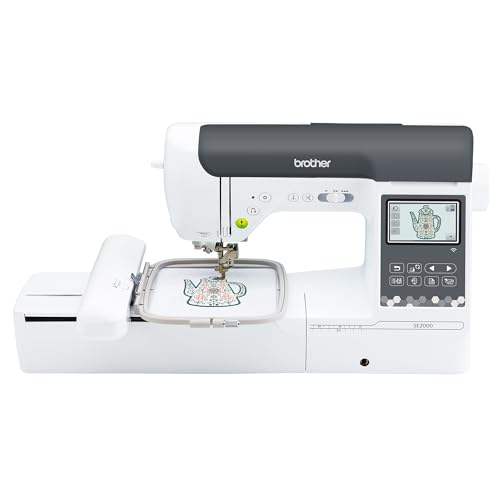
Best 5×7 combo
Brother SE2000 (opens Amazon in a new tab)
Best for: Sewists who want a larger embroidery field without buying a separate embroidery-only unit
Pros
- 5" x 7" embroidery area
- Large built-in design and stitch libraries
- Sewing-plus-embroidery flexibility
Cons
- Higher price band than 4" x 4" combos
- More features than a pure beginner needs
Skip it if: You only sew and never embroider
What owners mention
Praise
- larger hoop than SE700
- one machine for two jobs
Complaints
- steeper learning curve
- bulkier than sewing-only machines
The SE2000 steps up to a 5″ × 7″ max embroidery area with 193 built-in designs and 241 sewing stitches on Brother’s page. Choose it when jacket and pillow motifs need more room than a 4″ × 4″ hoop allows, and you still want sewing on the same machine. It sits in a higher band than the SE700, so pay for the larger field only if you will use it.
PE900 — 5×7 embroidery-only (prose only)
The Brother PE900 is the embroidery-only lane for a 5″ × 7″ field, with 193 designs, thirteen fonts and USB plus wireless LAN / Artspira on Brother’s page. We are not rendering a product box or buy button until a base Amazon listing is confirmed — bundle listings muddy the buy. Until then, treat the SE2000 as the verified 5×7 option on this page if you need sewing too.
What to look for in your first embroidery machine
Hoop size (4x4 vs 5x7)
Hoop size caps the largest design you can stitch in one placement. 4″ × 4″ covers monograms and small motifs; 5″ × 7″ opens larger centers without re-hooping as often. Match the hoop to the projects you will actually make in the first year.
Embroidery-only vs combo
Embroidery-only machines keep the table free for hooping if you already sew elsewhere. Combos save space and money when you want one footprint for both jobs. Neither replaces a multi-needle business machine.
Built-in designs and fonts
Built-in designs and fonts let you practice without buying files on day one. Counts on this page come from Brother’s published product pages — use them as a starting library, not as a lifetime ceiling.
Getting designs onto the machine (USB, wireless, apps)
Wireless LAN and apps such as Artspira reduce cable friction on the PE545 and SE700. USB still matters on some models. Confirm the transfer path on the live product page for the exact machine you buy.
Stabilizer, thread and needles you’ll also need
Plan a small kit of cut-away and tear-away stabilizer, embroidery thread, bobbin thread and embroidery needles before your first real project. A clean stitch-out depends as much on those supplies as on the machine.
Single-needle vs multi-needle machines
Home beginner machines on this page are single-needle tools: you change thread colors as the design runs. Multi-needle machines make sense when embroidery is a business and color changes eat your day. Upgrade when volume and turnaround demand it, not on week one.
Sources and last checked4 sources
- Brother PE545 product page · checked
- Brother SE700 product page · checked
- Brother SE2000 product page · checked
- Brother PE900 product page · checked
FAQ
What is the easiest embroidery machine for a beginner?
The easiest path is a modern Brother home embroidery machine with a color touchscreen or clear menus and wireless design transfer. On this short list that usually means the PE545 for embroidery-only or the SE700 if you also want to sew. Start with built-in designs before you buy advanced software.
Is a 4x4 hoop big enough?
A 4″ × 4″ field is enough for monograms, patches, pockets and many small motifs. It is tight for large jacket-back designs or big pillow centers in one hoop. If bigger single-hoop designs are the goal, step up to a 5″ × 7″ machine such as the SE2000.
Do I need software to use an embroidery machine?
No for day one. Built-in designs and fonts cover practice projects. Wireless apps such as Brother’s Artspira and USB transfers help when you want outside designs. Full digitizing software is optional until you outgrow the built-in library.
Can a sewing and embroidery combo replace two machines?
For many hobbyists, yes. A combo such as the SE700 or SE2000 handles everyday seams and small embroidery in one footprint. Dedicated embroidery-only machines keep the embroidery workspace free if you already own a strong sewing machine. Choose by space and how often you embroider.
What else do I need to start machine embroidery?
Plan on embroidery thread, bobbin thread, stabilizer matched to the fabric, fresh embroidery needles, marking tools and practice blanks such as towels or scrap cotton. The machine is only one part of a clean first stitch-out.
About the SewPicks editors
SewPicks is written by named editors who compare sewing, quilting and embroidery machines from manufacturer specs and patterns in owner reviews. We do not run physical product trials. Our picks change when models are discontinued or better options appear.
 James WhitfieldReviews editor
 Maya ChenEditor-in-chief
- Rachel TorresQuilting & embroidery editor
Meet the full team on Authors & Editors, or read How We Choose.